Trusted on 1,000+ WordPress sites

Keep Your Website Content Fresh & Evergreen

Bulk update years, replace text, fix dates across your entire WordPress site in seconds. No coding required.
★★★★★ 5/5 — Loved By 1000+ Content Creators
Year Updater dashboard preview
The Problem

Why Content Gets Outdated?

Old years in titles. Stale dates. Outdated claims. Manually editing hundreds of posts takes hours — and it's error-prone.

Old years in titles & content
Outdated publication dates
Stale text & claims in articles
Manually editing posts one-by-one
Risk of typos & inconsistencies
Can't track what you've updated
The Solution

Update Everything in Seconds

Evergreen Content Updater does the heavy lifting. Preview before you run. One click. Done.

Features

Everything You Need to Keep Content Fresh

Three powerful tools, one plugin — built for serious publishers, agencies and bloggers.

📅

Year Updater Freeium

Bulk replace old years in post titles and content. Swap "2025" with "2026" across 500 posts in seconds — with preview highlights.

📆

Date Updater Free

Bulk update post dates by category, tag, or spread dates across any time period. Republish old posts with fresh dates for SEO.

✏️

Content Updater Pro

Find & replace ANY text across your site. Update claims, stats, links, phrases — like Ctrl+H for your whole WordPress database.

👁️

Preview Before Running Free

See every match highlighted before you hit run. Select or deselect individual posts. Zero surprises, zero regrets.

Batch Processing Free

Update hundreds of posts instantly with live progress. No timeouts. No manual post-by-post editing. Ever.

🛡️

Smart HTML Handling Free

Our replacement engine never touches HTML tags or image URLs. Only your actual content text — safely.

How it works

3 Simple Steps

From install to bulk-updated in under a minute.

1

Install

Download from WordPress.org. One-click install. No setup, no configuration.

2

Preview

Enter your search term. Click Preview. See exactly what will change before anything runs.

3

Execute

Click Run. Your site updates instantly with a live progress log. Done!

Inside the plugin

See It in Action

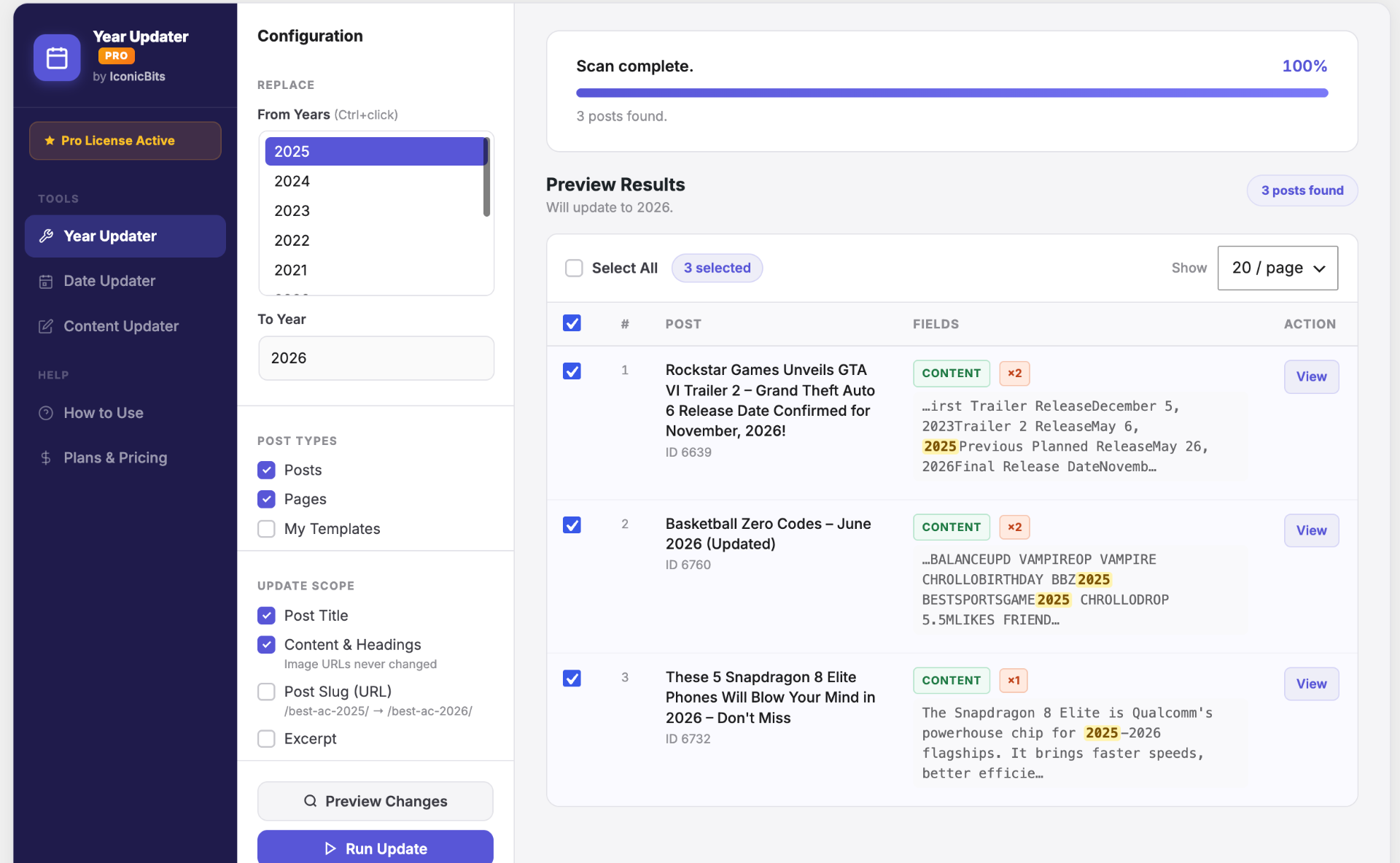
Year Updater — Preview & Replace

Pick the years to find, set your target year, choose scope, and preview every match before replacing. Multi-select with Ctrl/Cmd.

  • Updates titles, content, slugs & excerpts
  • Image URLs are never touched
  • Highlighted snippets show every match
Year Updater preview results

Bulk Date Updater

Refresh "last updated" dates by category, tag, or across all posts. Spread updates over a time range to look natural to search engines.
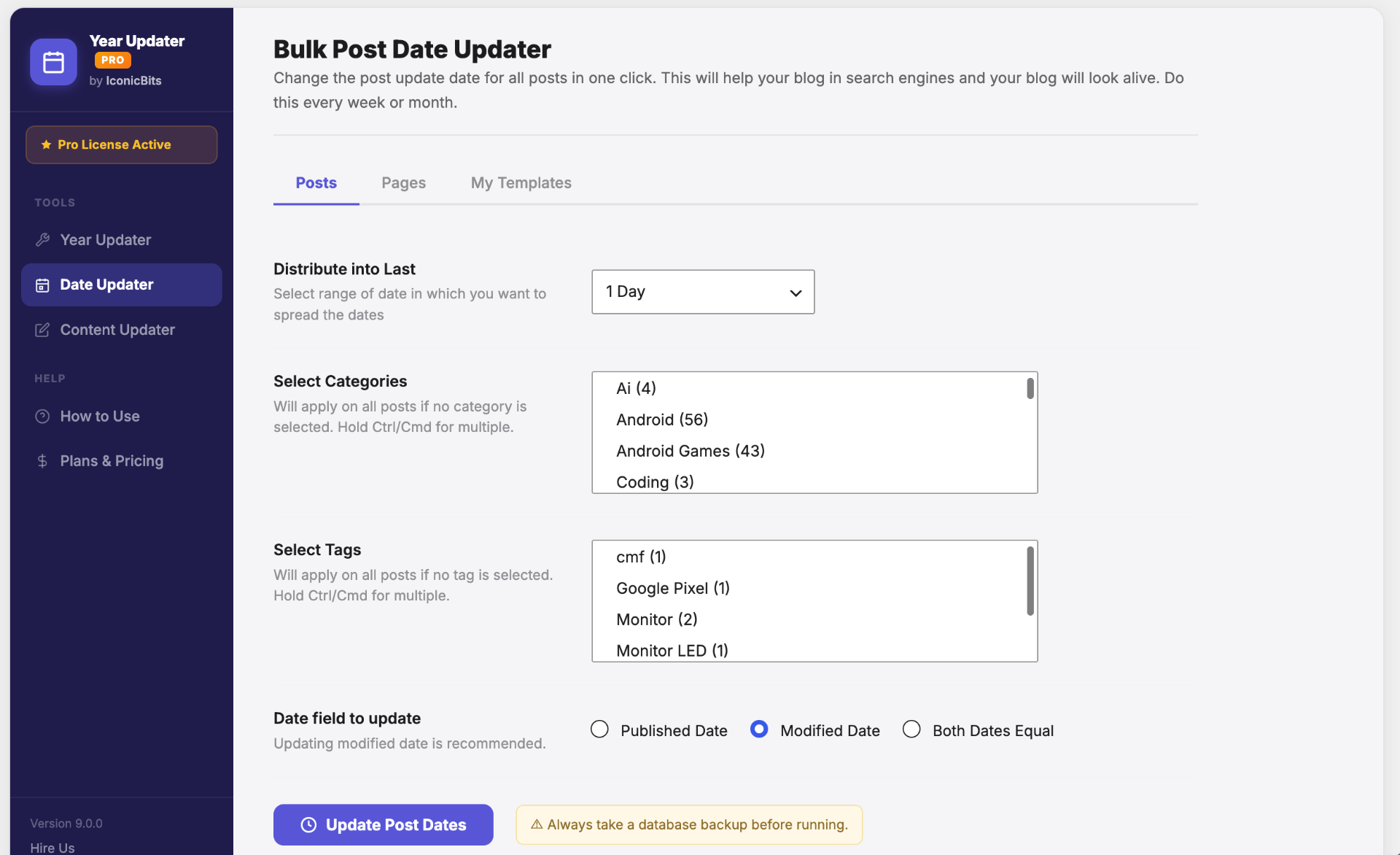
  • Posts, pages & custom post types
  • Distribute over hours, days or months
  • Update published, modified or both
Bulk date updater

Content Updater — Find & Replace Pro

Find and replace any text across your entire site. Case-sensitive, regex support, scope to specific post types and fields.
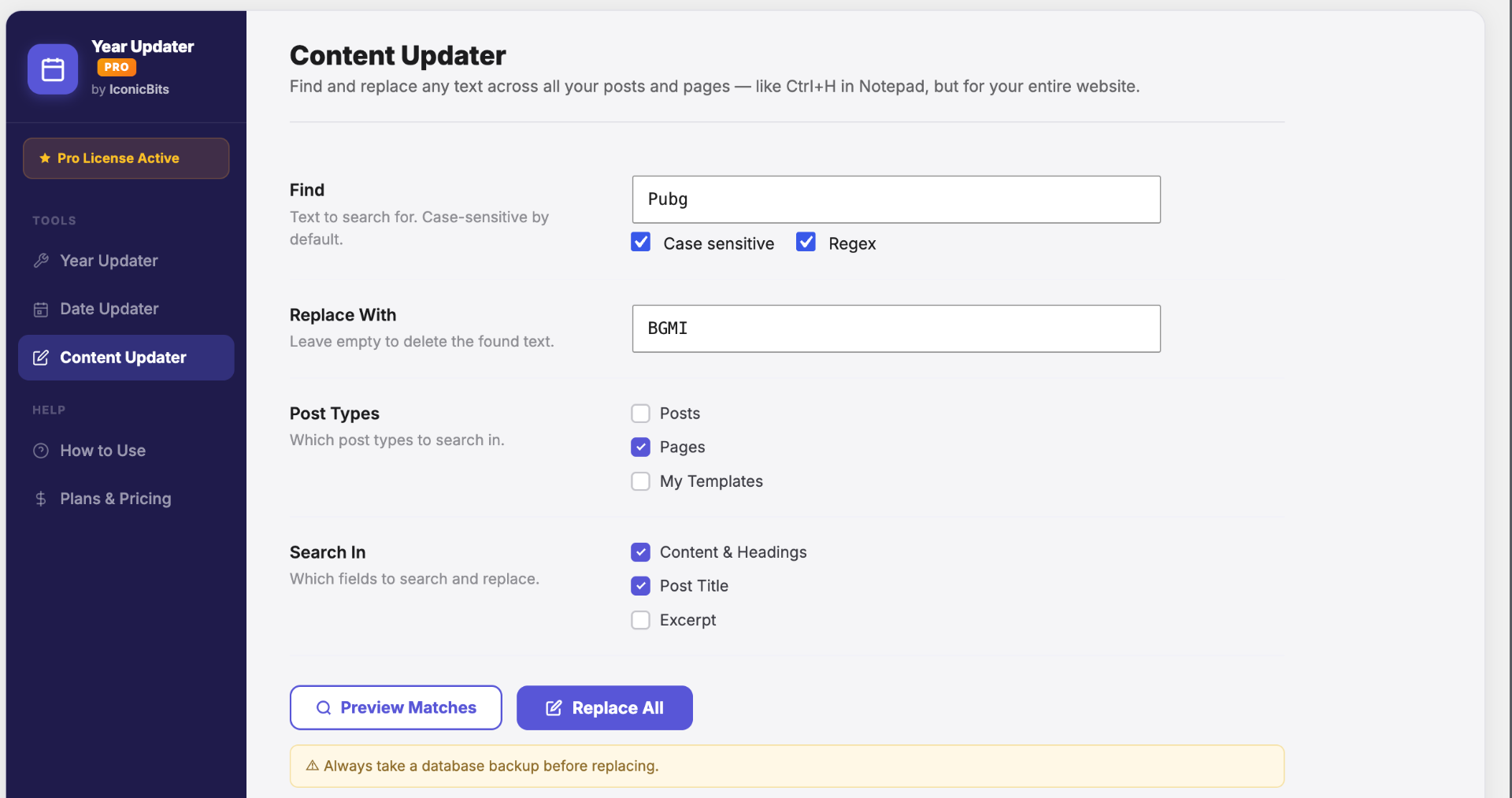
  • Regex & case-sensitive matching
  • Choose posts, pages or templates
  • Search titles, content, excerpts
Content Updater find and replace

Preview Matches Before Replacing

Every match is shown with full context and counts. Open individual posts, deselect any you don't want changed, then run with confidence.
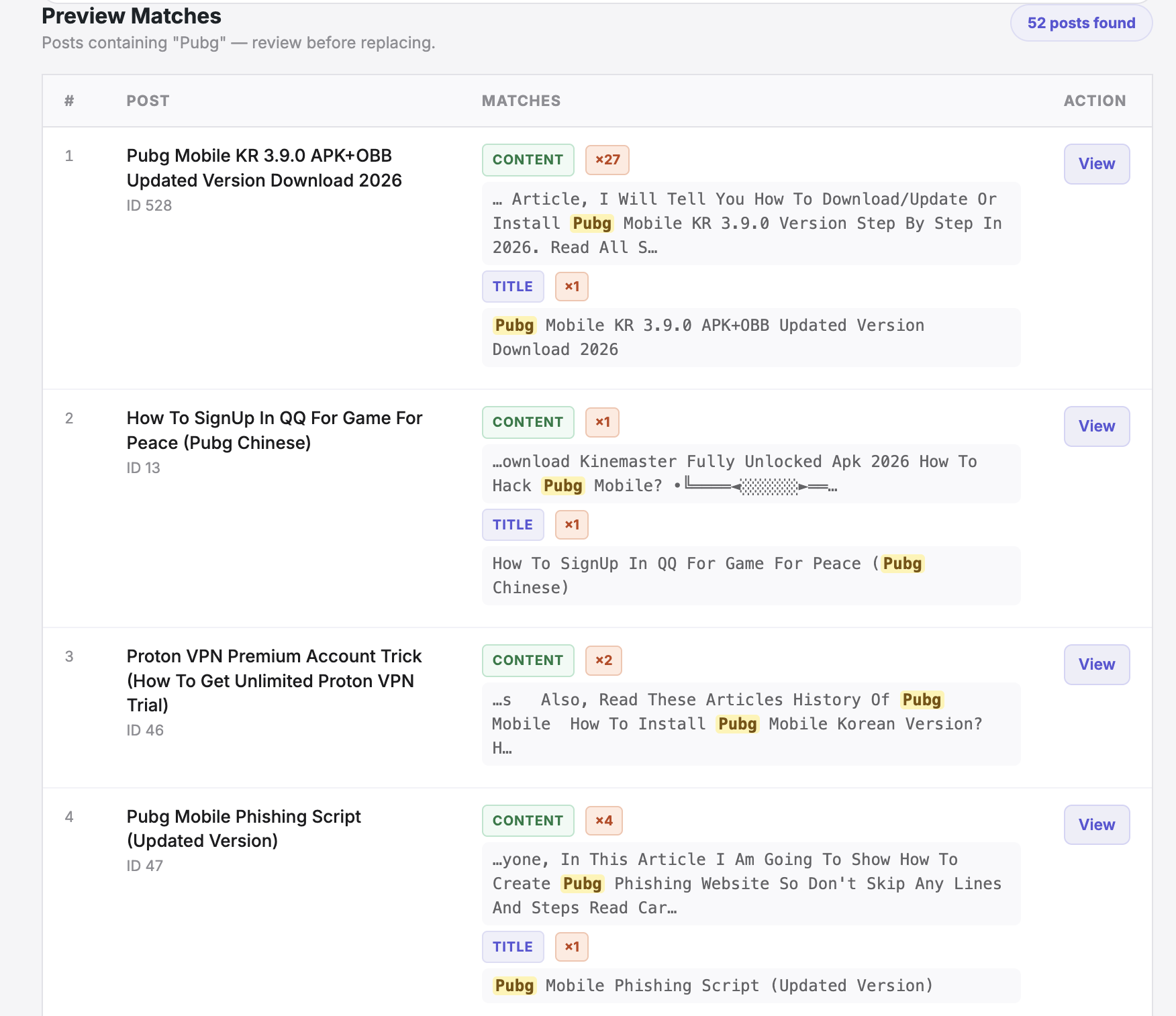
  • Per-field match counts
  • Context snippets with highlights
  • Open posts in a new tab to verify
Preview matches table
Use cases

Real Examples From Real Sites

📰 News Website

Replace "2024 Elections" with "2025 Elections" across 150 articles in 10 seconds. Update publication dates to current year.

💼 SaaS Blog

Update pricing across 200+ blog posts when you raise prices. Replace "$99/month" with "$129/month" instantly.

📚 Publishing Site

Bulk update outdated statistics and claims. Replace old study references with new research links sitewide.

✍️ Personal Blog

Every January, update all articles with the current year. Republish old posts with fresh dates for an SEO boost.

Pricing

Simple, Transparent Pricing

Free forever. Upgrade anytime. No credit card required for the free version.

Free

For trying it out

$0
Forever • 1 site
  • Year Updater
  • Date Updater
  • Preview before running
  • 50 lifetime replacements
  • Batch processing
  • Content Updater (Find & Replace)
  • Unlimited replacements
Get Free Version

Pro Annual

For active publishers

$24.99
Per year • 1 site
  • Everything in Free
  • Content Updater (Find & Replace)
  • Unlimited replacements
  • Post Slug & Excerpt update
  • Regex & case-sensitive
  • Priority support
  • All future updates
Start Pro

Agency / Bulk

For agencies & networks

$999
One-time • 100 sites
  • Everything in Pro
  • 100 websites included
  • Lifetime access
  • Lifetime updates
  • Priority support
  • Multisite friendly
Get Bulk License
Compare

Free vs Pro at a Glance

FeatureFreePro
Year Updater
Date Updater
Content Updater (Find & Replace)
Replacements50 lifetimeUnlimited
Post Slug / Excerpt update
Preview
Batch processing
Priority support
Regular Updates
CostFree$24.99/yr
Testimonials

Trusted by Content Creators & Agencies

"
★★★★★

"Saved me an entire weekend. Updated 400+ posts from 2024 to 2025 in under a minute. The preview is the killer feature."

RM
Rahul M.Tech Blogger
"
★★★★★

"Manage 30 client sites. The bulk license paid for itself in the first week. Regex find & replace is unbelievably useful."

SK
Sara K.WP Agency Owner
"
★★★★★

"Finally a find-and-replace plugin that doesn't break HTML. The date updater alone is worth the Pro upgrade for SEO."

JD
James D.SEO Consultant
1,000+
Active installs
500K+
Posts updated
5/5
Super rating
24/7
Expert Support
FAQ

Got Questions?

Is it safe to use?
Completely safe. We never touch HTML tags or image URLs — only text content. Preview everything before running, and always take a database backup (we remind you before every operation).
Does it work with all post types?
Yes. Posts, pages, custom post types, and templates. Works everywhere standard WordPress content lives.
Can I undo changes?
You can restore from your backup. That's why we always recommend backing up before bulk operations — restoring is a one-click undo from any standard WP backup plugin.
What about custom fields?
Currently works on post titles, content, excerpts, and slugs. Custom fields (ACF / meta) support is coming soon.
Do you store my data?
No. Everything runs on your server. We never see your content. No external API calls. No tracking.
Can I use it on multiple sites?
Free = 1 site. Pro Annual = 1 site. Lifetime = 1 site. Agency / Bulk = 100 sites with lifetime updates.
What if I need help?
Pro users get priority email support. Free users can check our docs and the WordPress.org support forum.
Is there a refund policy?
Yes. 14-day no-questions-asked refunds on all paid plans through Freemius.
Will it slow down my site?
No. Bulk operations run server-side in batches. Zero frontend impact. Typical bulk updates finish in seconds.
Can I test it free first?
Absolutely. Download the free version from WordPress.org and get 50 lifetime replacements to play with — no signup required.

Ready to Keep Your Content Fresh?

Get started free. Upgrade anytime. No credit card required. Install from WordPress.org and start updating in 30 seconds.